
Your whole school, first bell to long bell.

One app for the whole school day, on every phone and office computer, in English, తెలుగు, हिन्दी, தமிழ் and ಕನ್ನಡ.
  1. First bell
  2. Attendance
  3. Homework
  4. Fees
  5. Exams
  6. Notices
  7. Parents
  8. Long bell
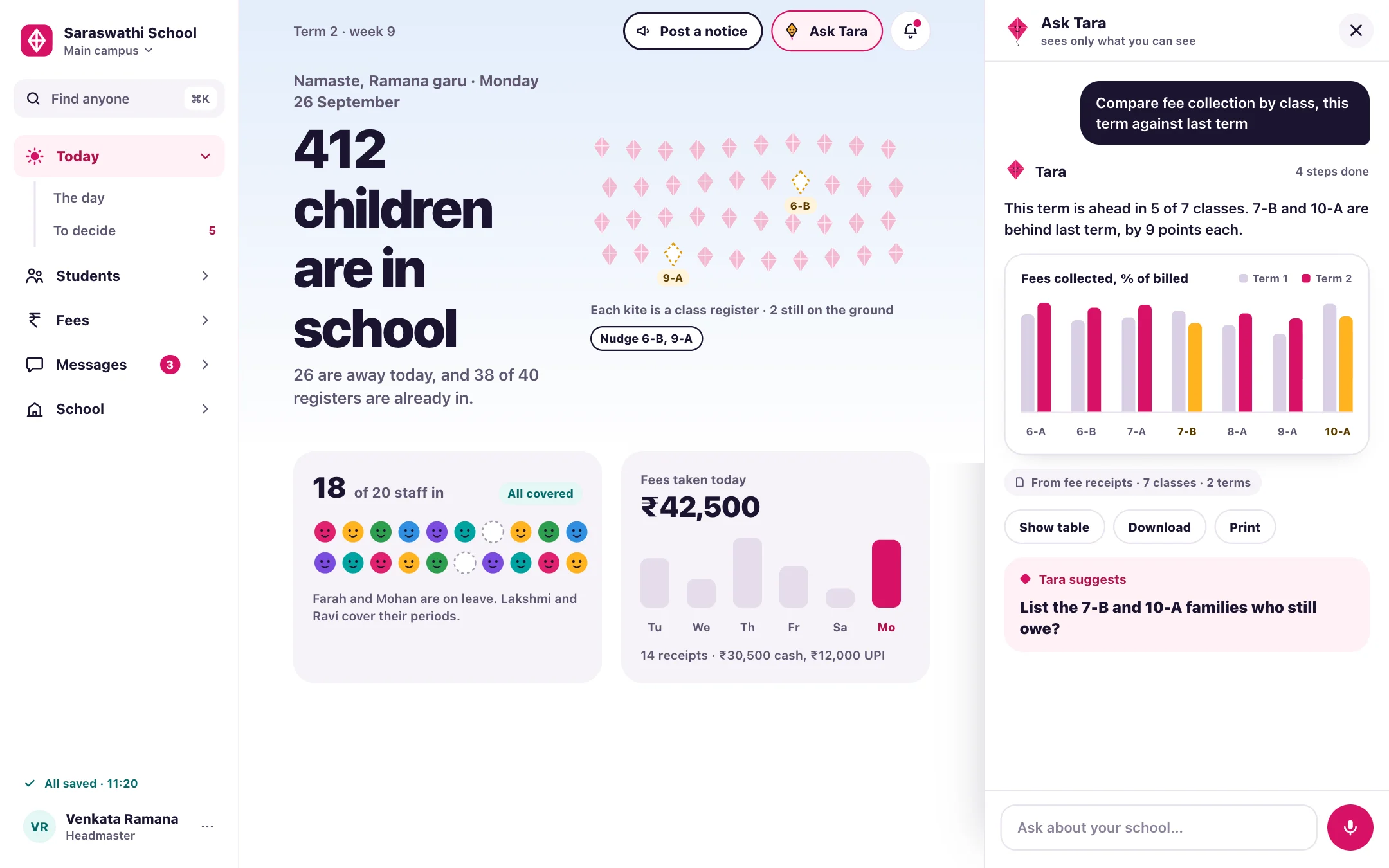
Longbell on a laptop: the headmaster's Today screen shows 412 children in school, a kite for every class register, staff and fees, with Tara open beside it comparing fee collection by class as a chart
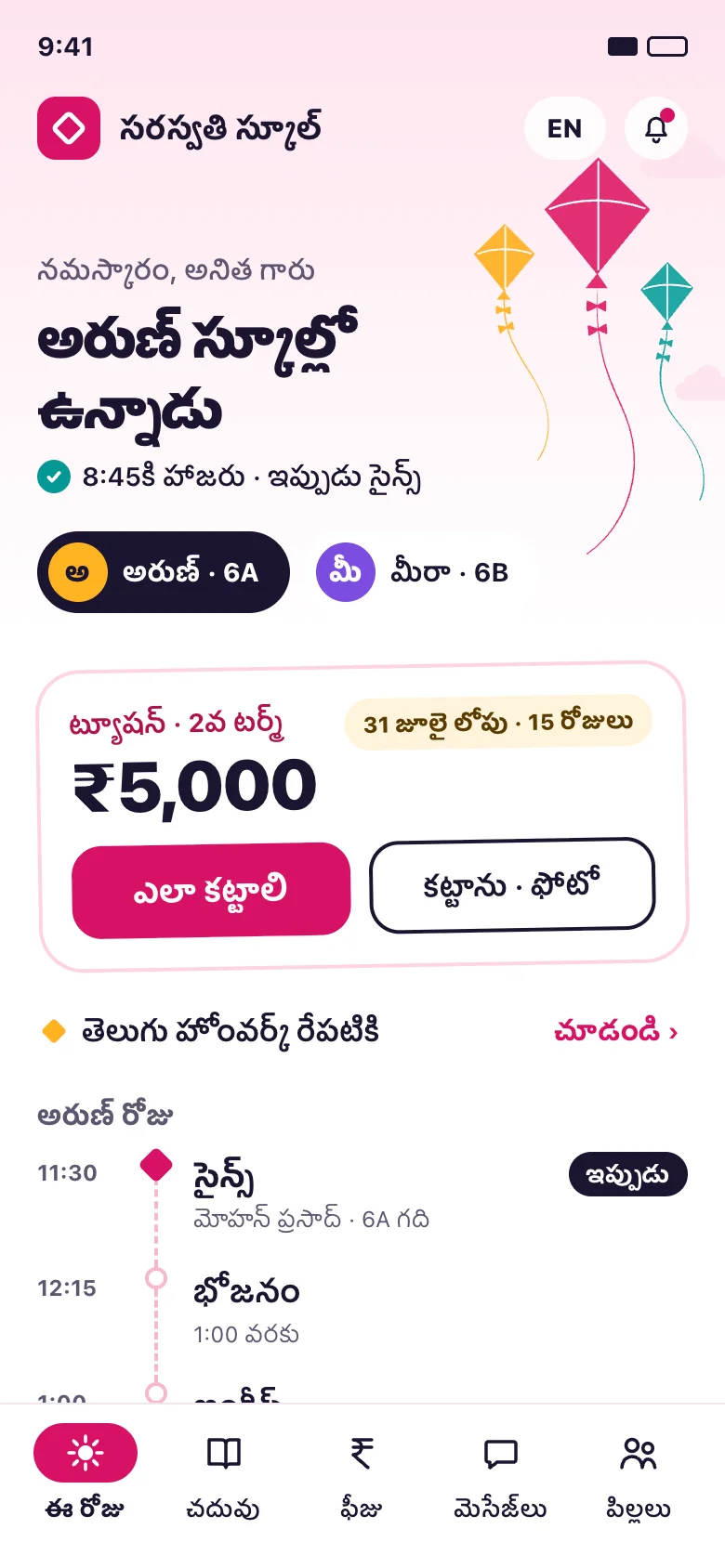
The parent app in Telugu: Arun is in school, the term fee, Telugu homework due tomorrow and today's timetable
  • Attendance
  • Homework
  • Exams & report cards
  • Fee counter
  • Receipts
  • Notices
  • Parent app
  • Timetable
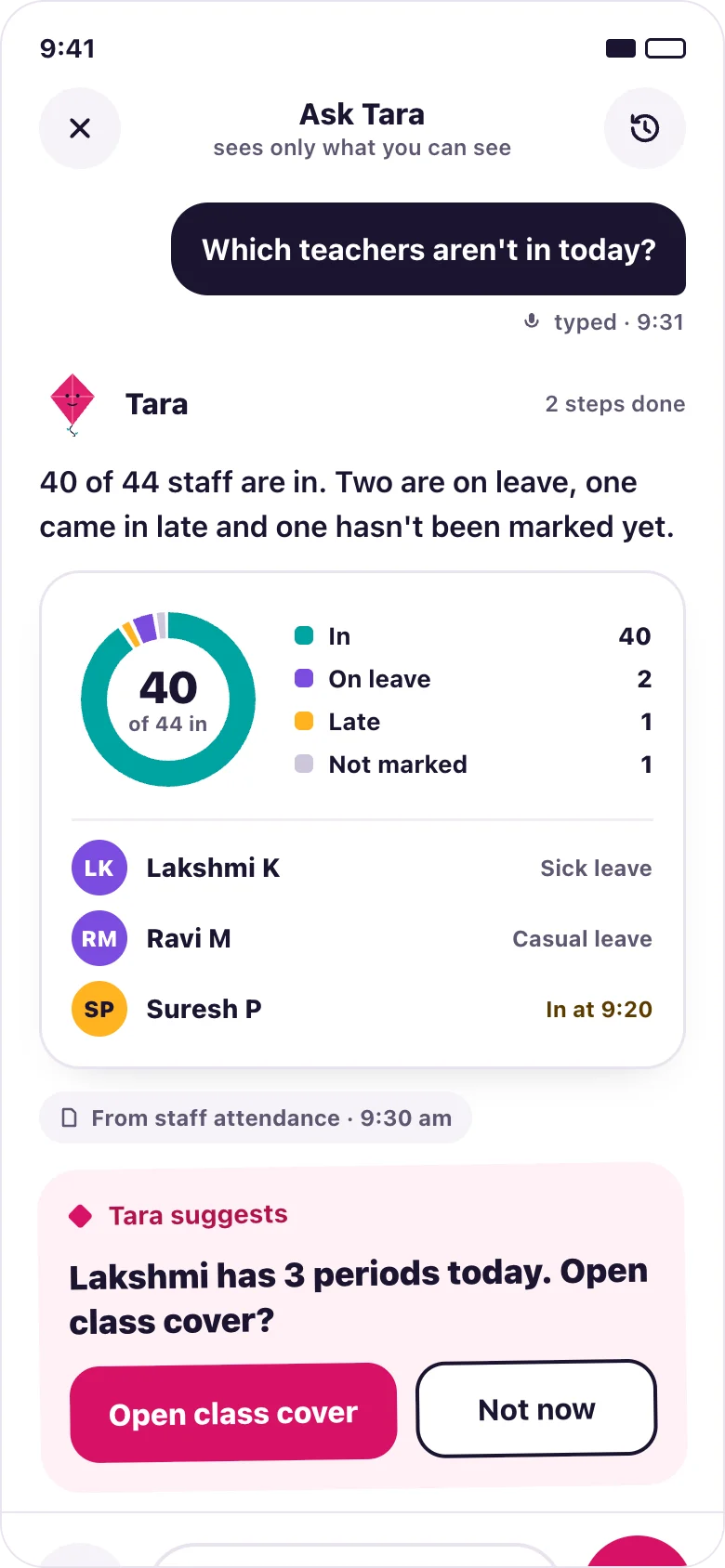
  • Staff & leave
  • Certificates
  • ID cards
  • Reports
  • Printing
  • Tara AI

Android, iPhone and the web.

  • AndroidPhones and tablets
  • iPhone and iPadFrom the App Store
  • WebAny browser, on any laptop or office computer

In five languages, chosen by each person:

  • English
  • తెలుగు
  • हिन्दी
  • தமிழ்
  • ಕನ್ನಡ

One minute, every feature

See the whole school run on one app.

Attendance, fees, WhatsApp, homework, exams, admissions, payroll, approvals, Tara and the rest, in 68 seconds. Jump to the part your school cares about most.

0:00 / 1:08

Who it’s for

Made for the way Indian schools actually run.

A single school, a group with branches, a coaching centre, or a team that would rather we did the setting up. Longbell fits, and Tara comes with it.

Everyone opens Longbell to their own day.

  • Headmaster & owner

    The whole school on one screen, and one inbox for decisions.
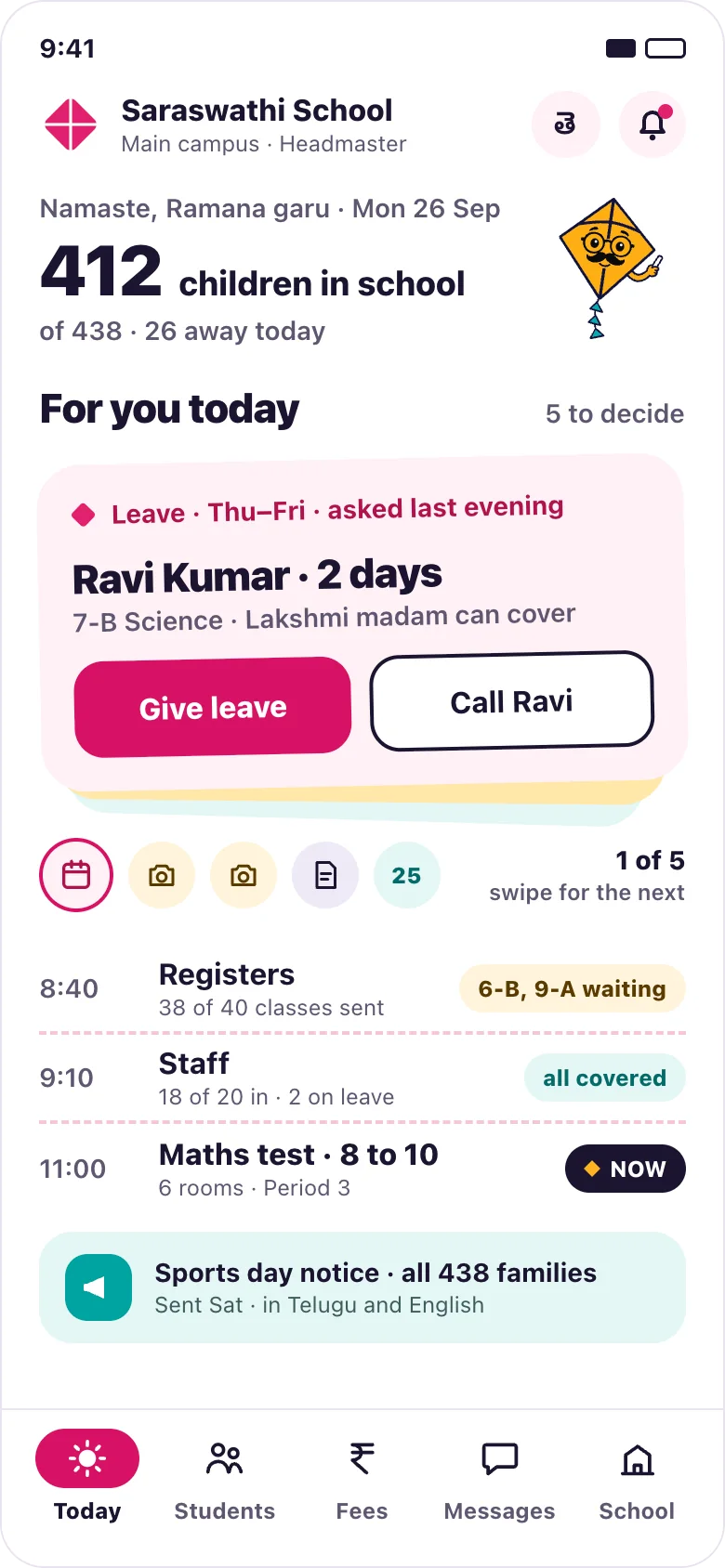
    Headmaster Today: 412 children in school, with a leave request waiting for a decision
  • Office & fee counter

    Fees in seconds, receipts that print, certificates with serials.
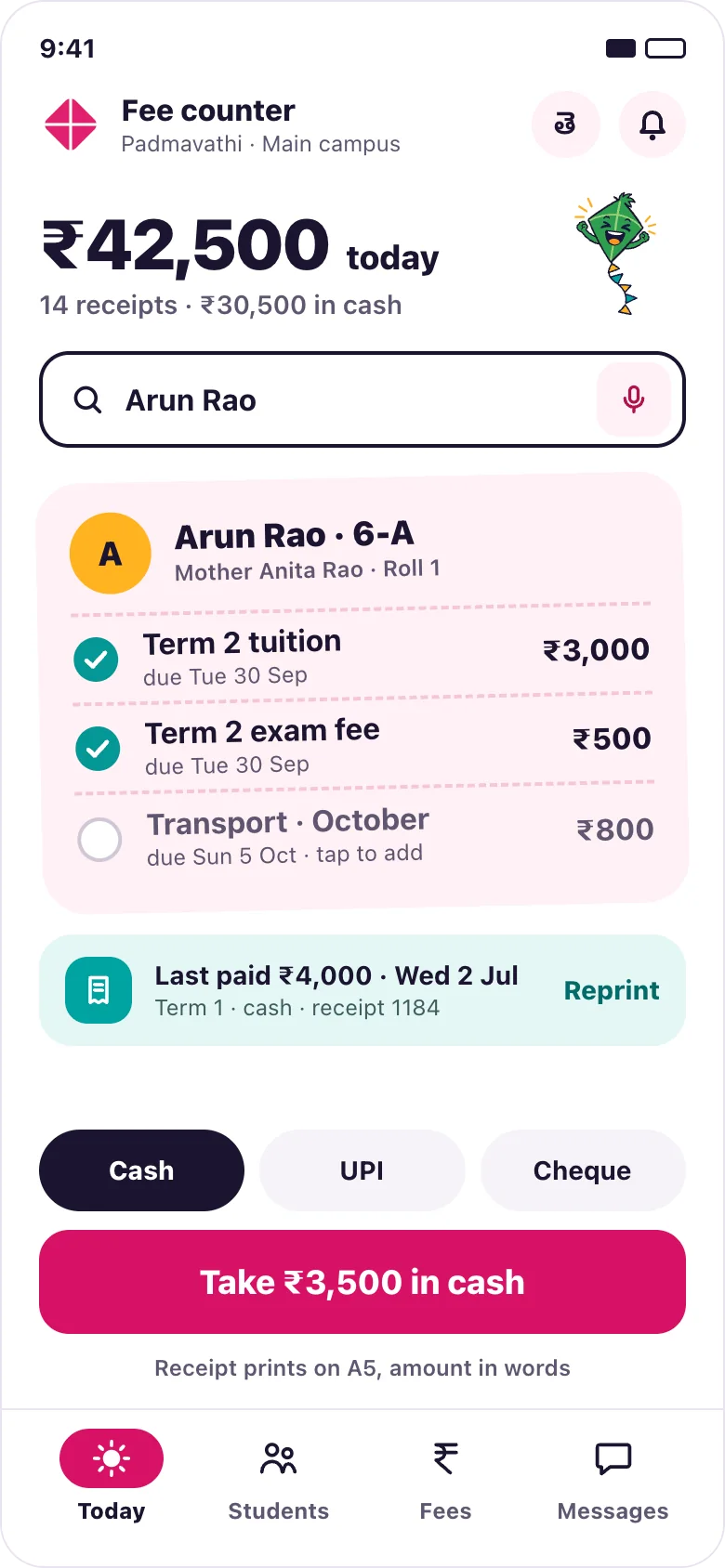
    Fee counter: ₹42,500 taken today, with Arun Rao’s term fees ticked to pay
  • Teachers

    Registers in a minute, homework said out loud, marks checked with Tara.
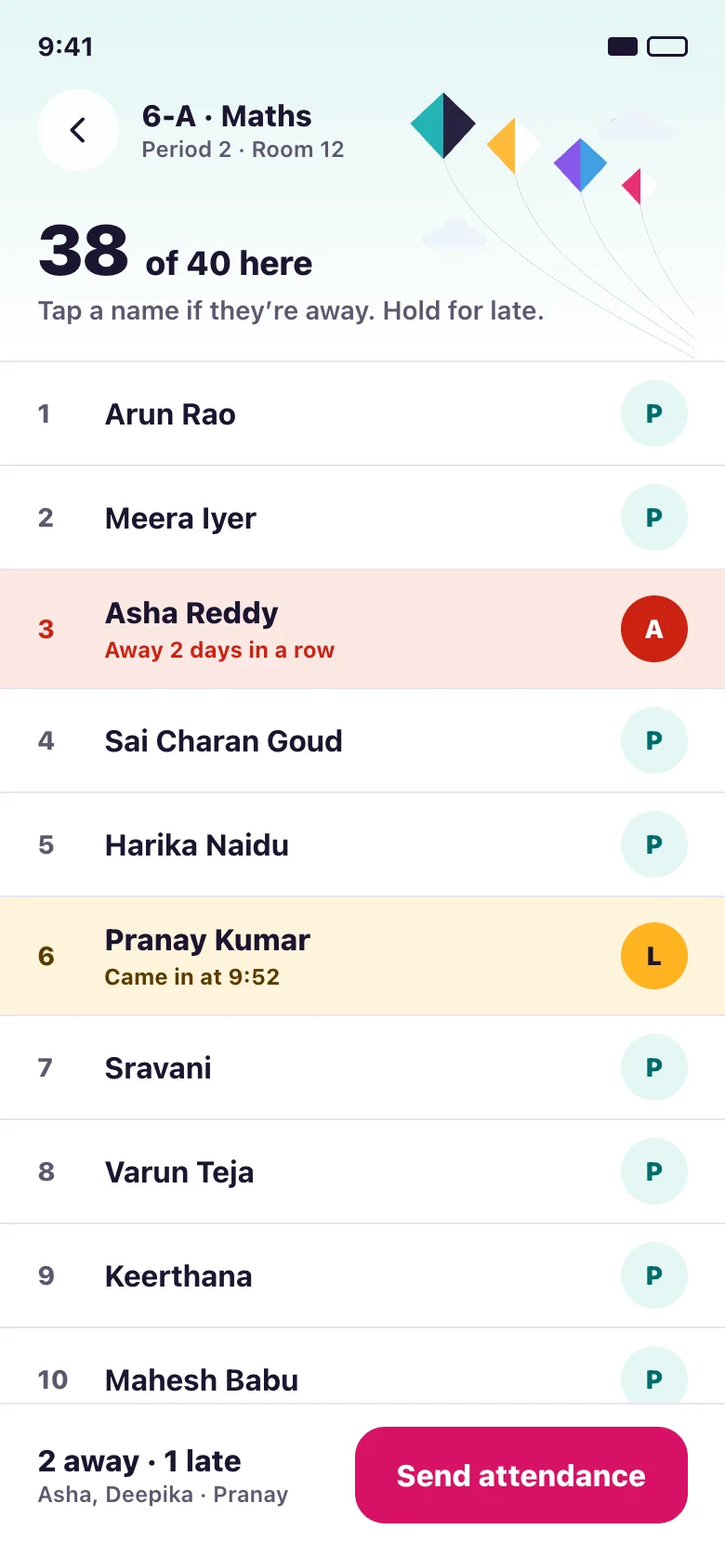
    6-A Maths register: 38 of 40 here, Asha Reddy away two days in a row
  • Parents

    Their child’s day, fees and results, in their own language.

    Parent Today in Telugu: Arun is in school, with the term fee due by 31 July
  • Children

    Homework with hints instead of answers, and answers they can say out loud.
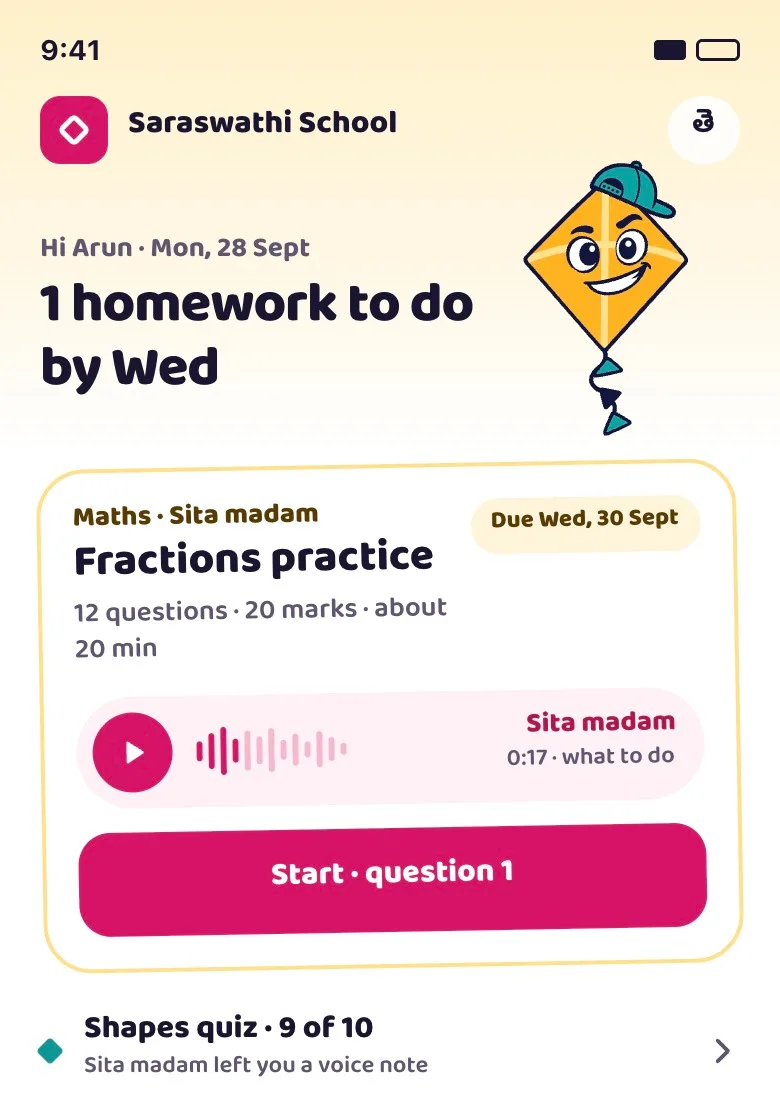
    Arun’s Today: one homework to do by Wednesday, with Sita madam’s voice note

AI at the core

Tara sees what you see. Does what you do. And a little more.

Tara is part of every screen in Longbell, for the head, the office, teachers and parents. She works from your school’s own records, inside your permissions, and nothing changes until you say yes.

  • Sees what you can see

    Ask about any of your school’s records. A class teacher’s Tara knows her classes. A parent’s knows their own child. Never more.

  • Does the work you would do

    Homework, messages home, fee receipts, staff attendance, exams, leave. She prepares it, shows it to you, and only then does it. For the rest, she opens the right page.

  • And the jobs you’d rather not

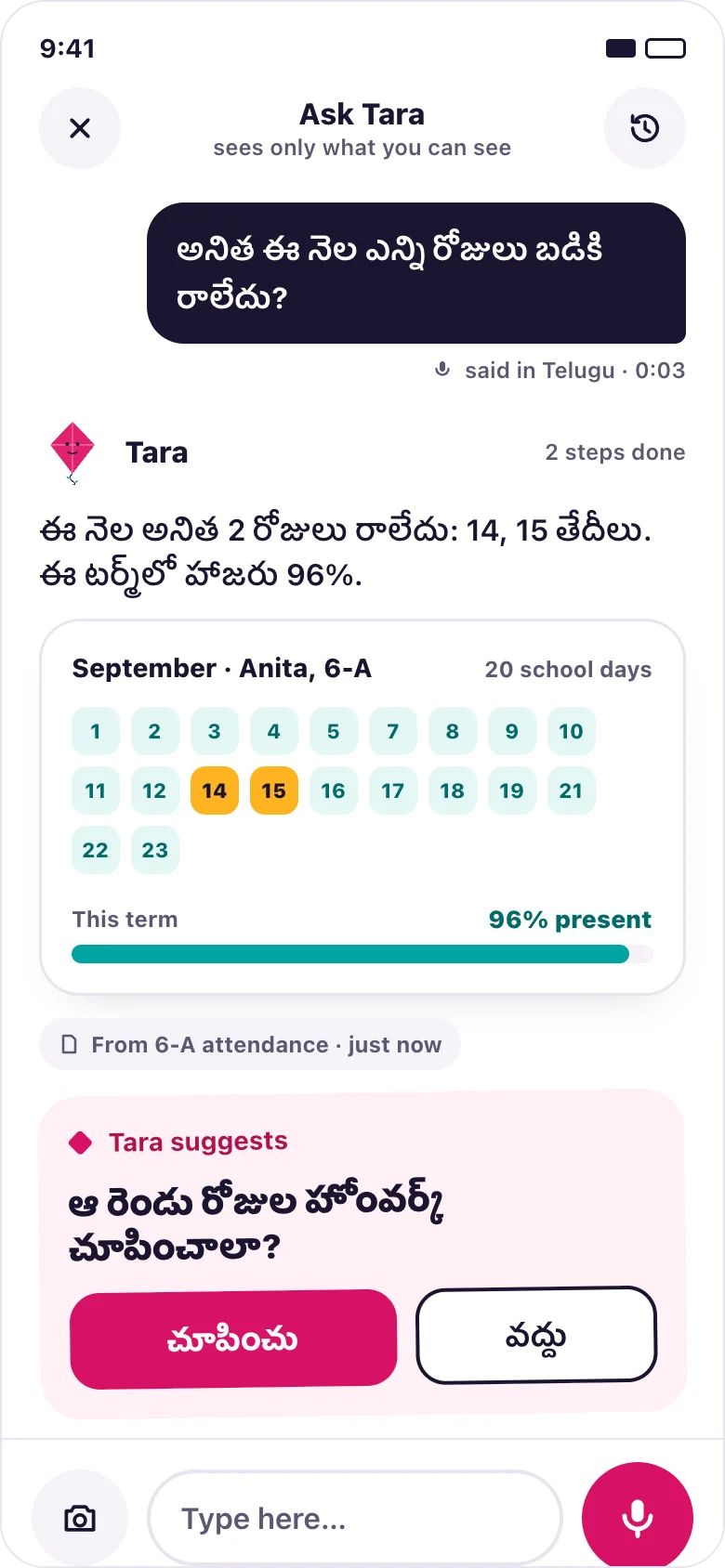
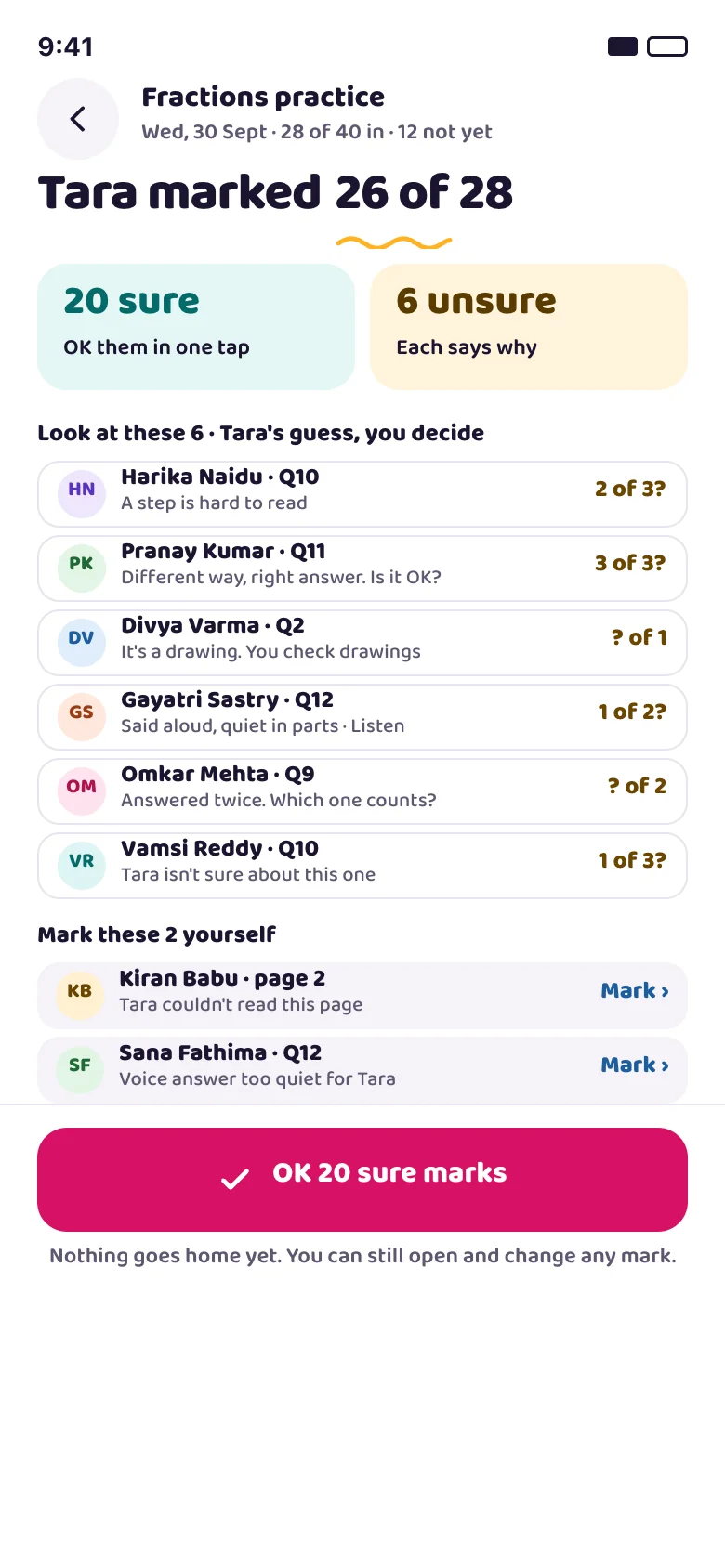
    Reads a photo of a register into a list. Drafts questions from a textbook page. Draws the chart. Talks in Telugu, English, or both in one sentence.
One conversation, start to finish

Everything Tara does
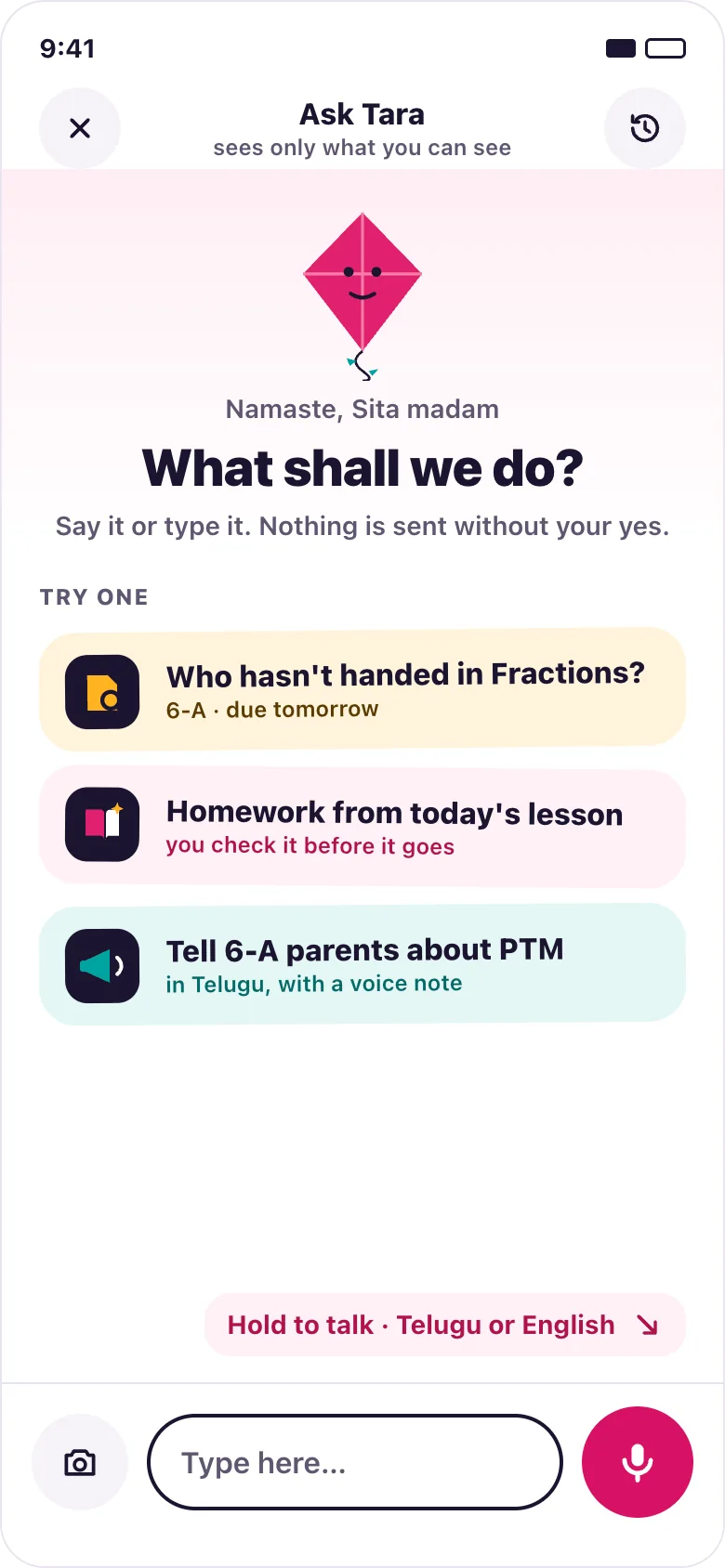
  1. Ask Tara start screen: Namaste, Sita madam. What shall we do? with suggestions

    Ask in your own words

    A question, a job or a file. Tara suggests where to start.
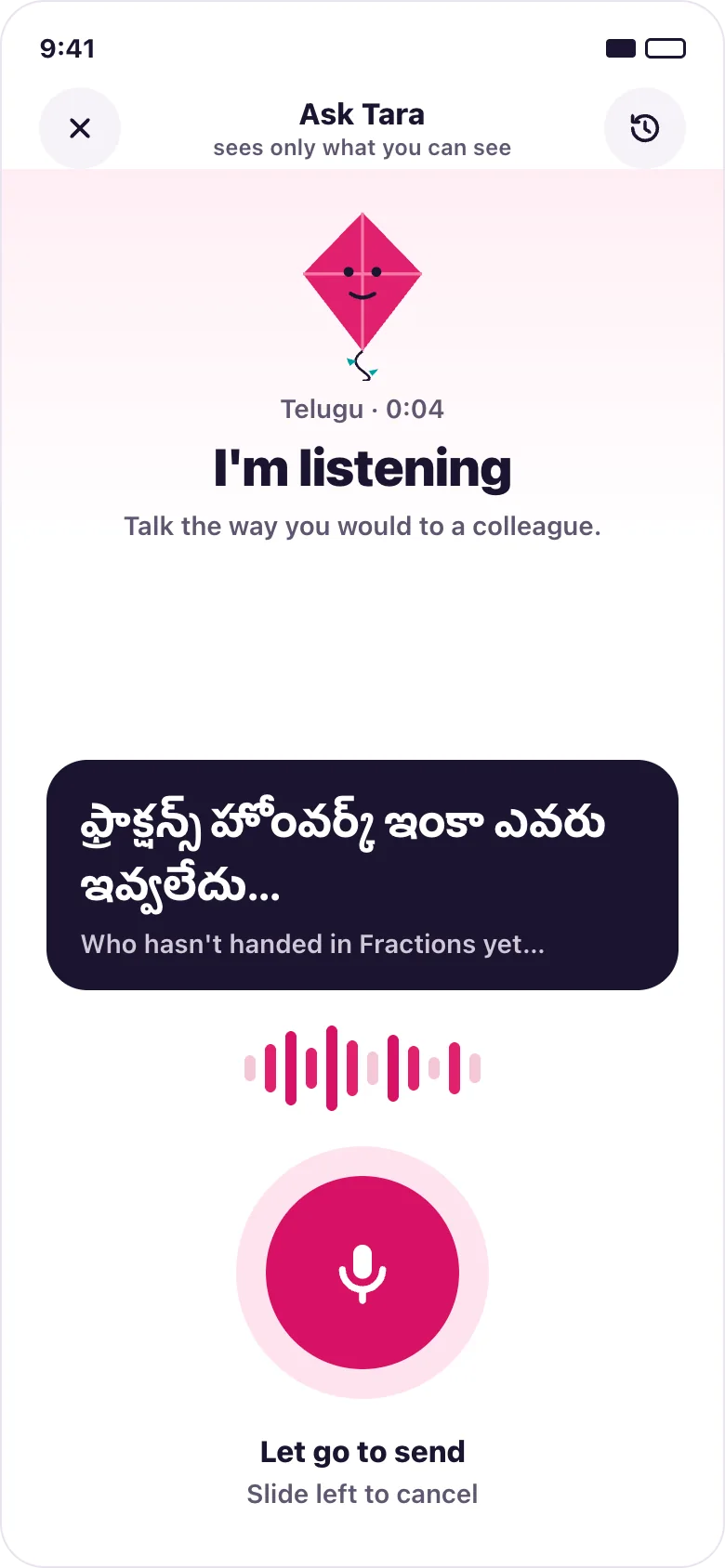
  2. Tara listening to a question spoken in Telugu

    Or just say it

    Hold to talk in Telugu, English or a mix of both.
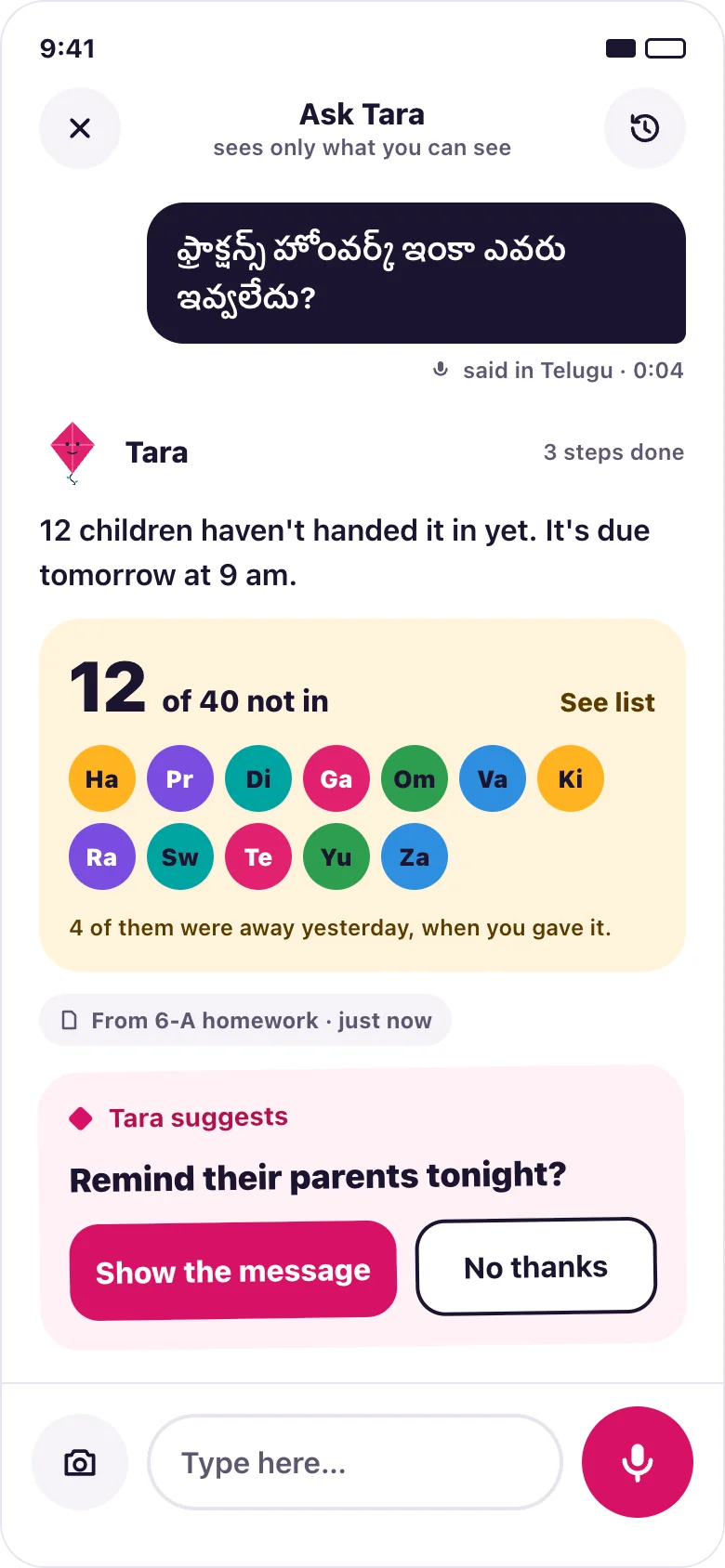
  3. Tara answers that 12 of 40 children have not handed in homework, citing 6-A homework as the source

    She reads your records

    Names, numbers, and where each answer came from.
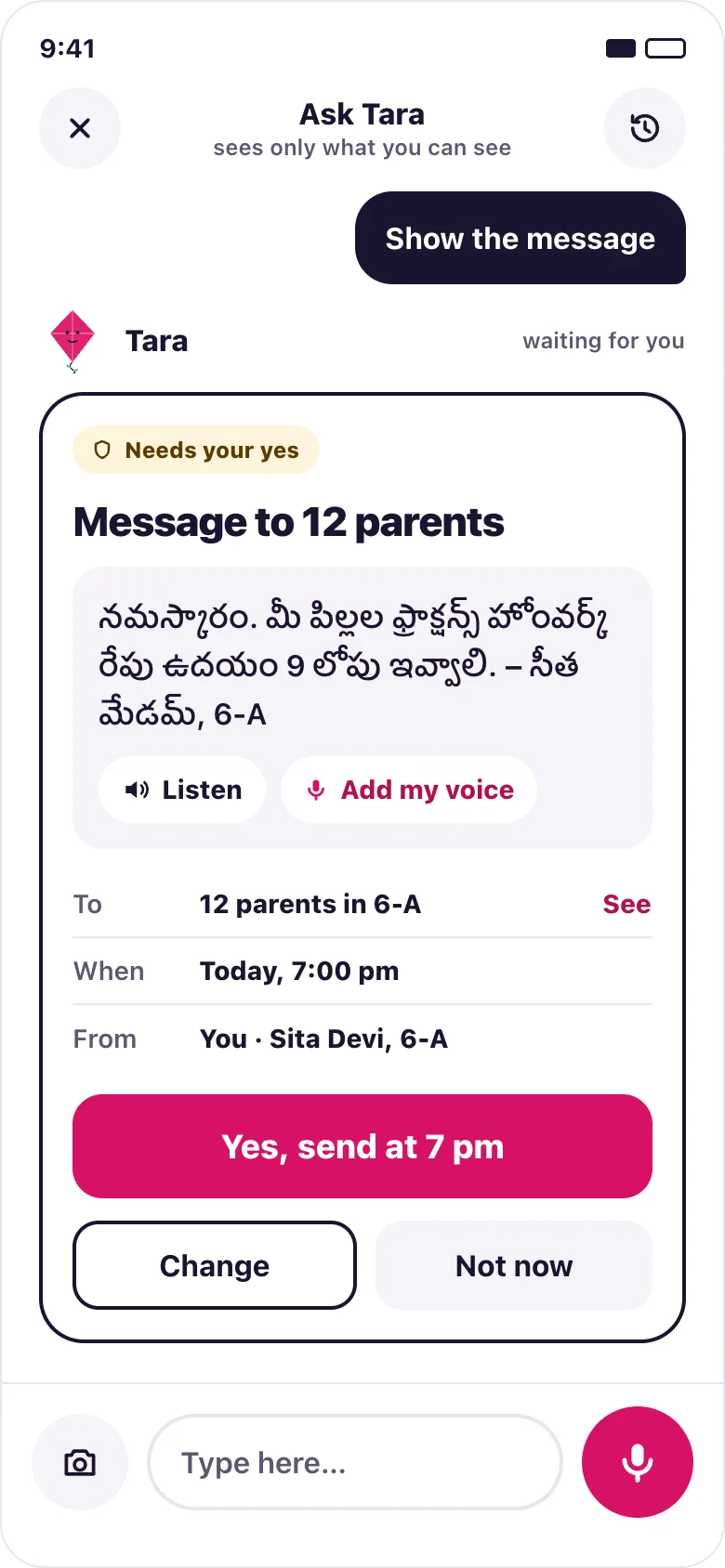
  4. A drafted Telugu message to 12 parents waiting for your yes

    You check before it goes

    Read it, hear it, change it, or say no.
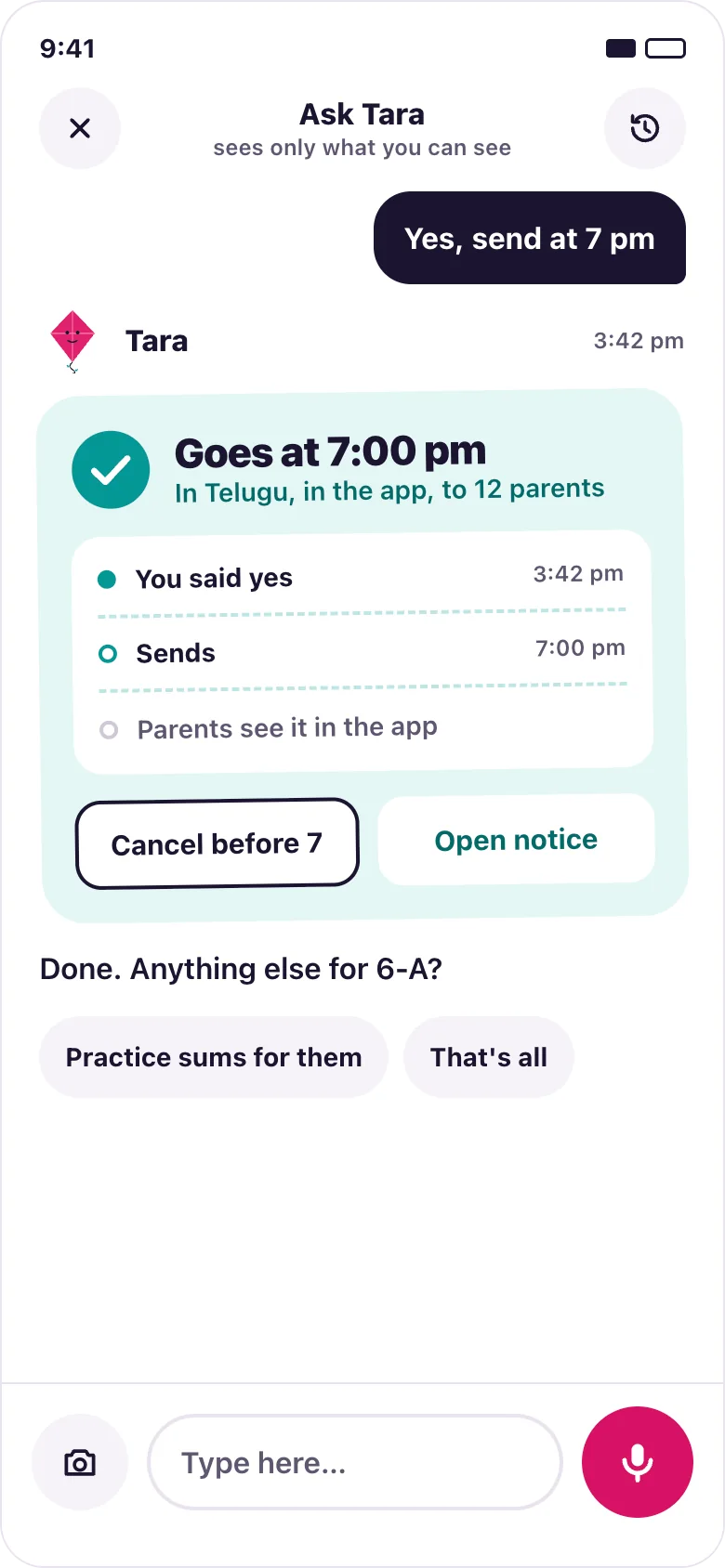
  5. Confirmation that the message goes at 7 pm to 12 parents, with a Cancel before 7 button

    Done, and still undoable

    Scheduled for 7 pm. Cancel any time before it sends.

Answers, charts & reports

Ask a question. Get the chart.

No report builder, no exporting to Excel. Ask Tara the way you’d ask the office, and she answers with the numbers, the chart and the names. Try one.
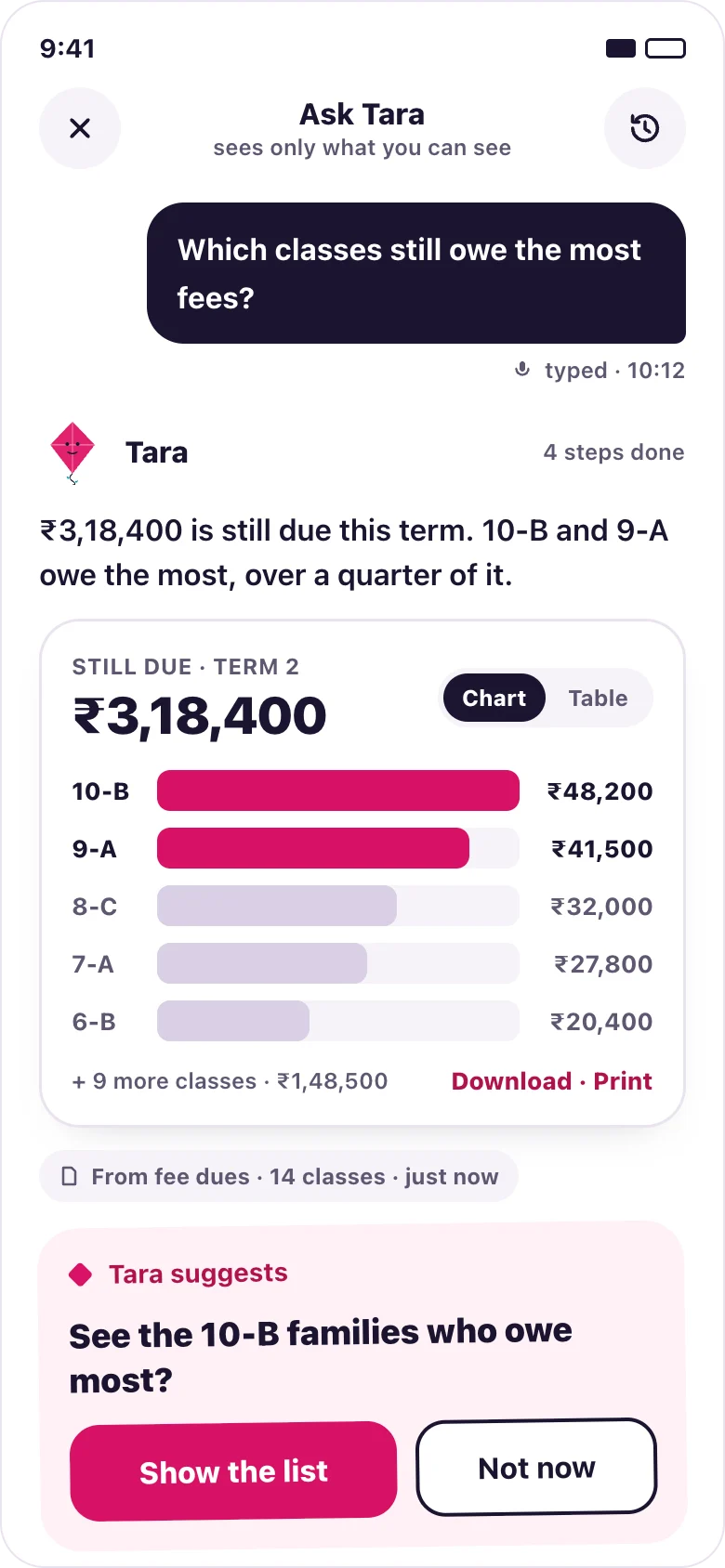
Tara answers that ₹3,18,400 is still due this term, with a bar chart of fees owed by class: 10-B ₹48,200, 9-A ₹41,500, and a suggestion to see the 10-B families who owe most
  • Charts that fit the questionBars, lines, donuts, stacked and side by side, drawn from your records.
  • The table behind every chartSort it, download it, print it for the staff meeting.
  • A source on every numberTap “From fee dues” and you are looking at the records she used.

Where Tara works

Wherever you are in Longbell, Tara is one tap away.

She isn’t a separate chatbot. She sits inside the app the head, the office, teachers and parents already use, and she knows which screen you are on.

Tara's panel beside the headmaster's Today screen: asked to compare fee collection by class, she answers with a bar chart

On a laptop, beside your work

Tara opens as a panel next to whatever you are doing, so the answer and the screen are side by side.

On a phone, hold and talk

On a phone Tara takes the whole screen. Hold the mic and speak the way you would to a colleague.

From search, anywhere

Type anything into Find. When nothing matches, Tara takes the question and gets it done.

Right inside the work

In homework, marks and imports, a “Tell Tara” button does the typing for you.

Everyone gets their own Tara.

Six people ask the same question. Each Tara answers from that person’s part of the school, and no further.

How did 6-A do in the unit test?

  • The headmaster’s Tara

    6-A averaged 71%, up 3 points on last term. Second best in Class 6.

  • The accountant’s Tara

    Marks aren’t part of your role. I can show 6‑A’s fees instead.

  • The class teacher’s Tara

    Average 71%. Divya and Kiran fell below 40. Shall I tell their parents?

  • The Maths teacher’s Tara

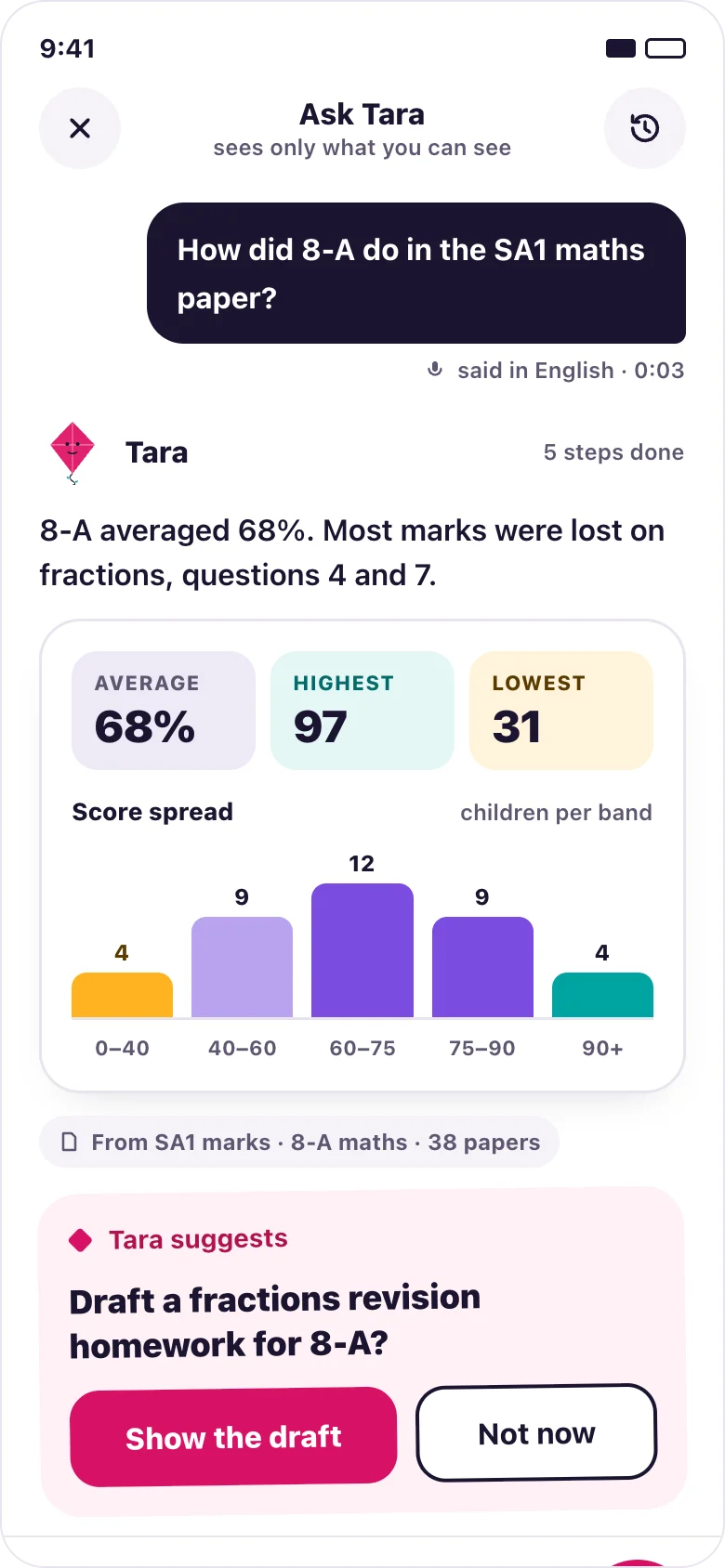
    Your Maths paper: average 68%. Most marks were lost on fractions.

  • Amma’s Tara

    Arun got 34 of 40 in Maths, up from 29 last time.

  • Arun’s Tara

    You got 34 of 40. Want 3 practice sums on fractions?

A school day

One day at school,
with Longbell in it.

Scroll down and the clock runs through a Tuesday at Saraswathi School. At each stop you see the exact screen someone at school uses at that moment, from the first register to a parent’s evening.

  • The hands follow the time of day
  • The pink arc fills from 8:45 to 4:00
  • Every screen is the real Longbell design
  1. 8:45 am · Class 6-A

    Attendance in under a minute

    Everyone starts present. The teacher taps the two who aren’t here and gives the late one a time.

    Take attendance for 6-A Maths: 38 of 40 here, Asha Reddy away, Pranay Kumar late
  2. 10:30 am · Staff room

    Homework, said out loud

    Hold the mic and say it. Tara turns it into questions, and nothing reaches the children until the teacher checks them.
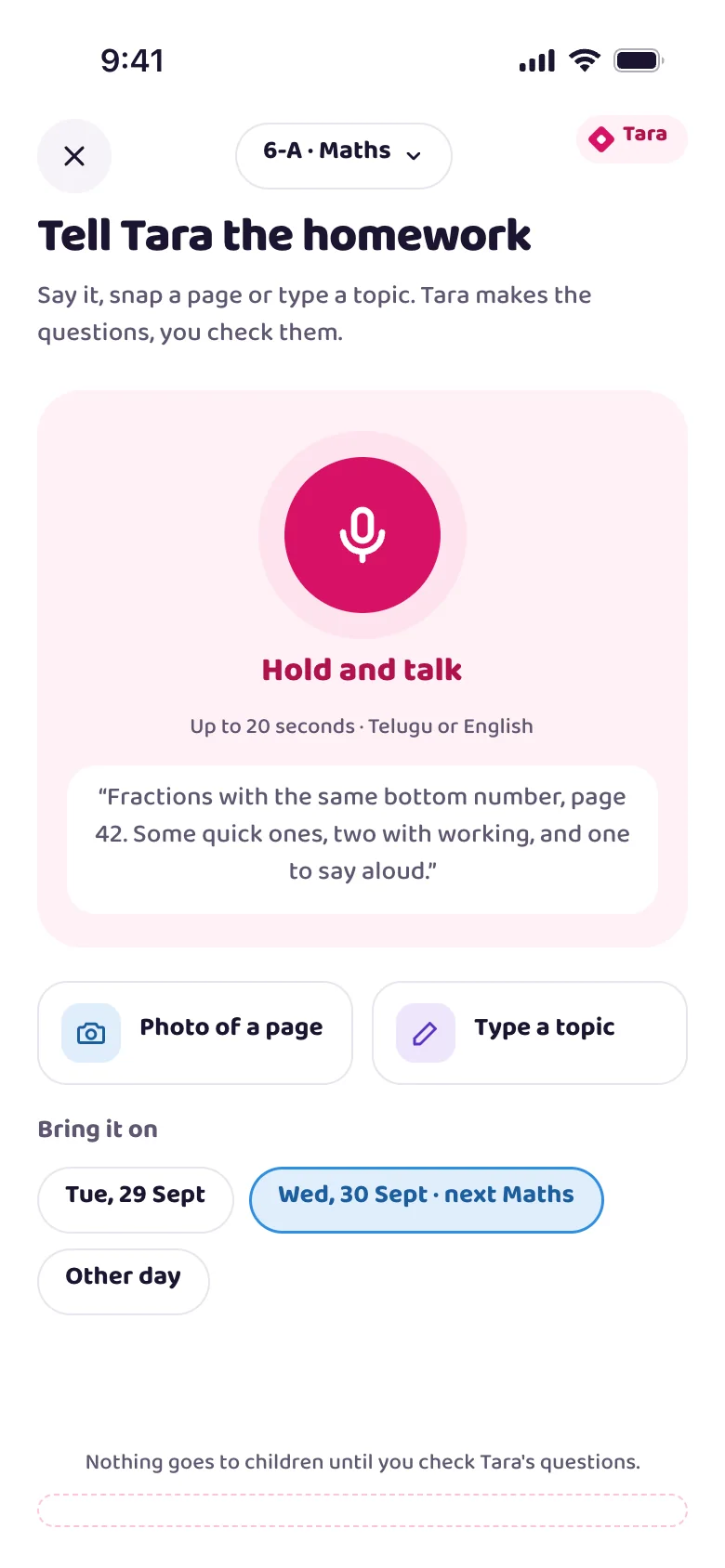
    Tell Tara the homework: hold and talk for up to 20 seconds in Telugu or English, or snap a page
  3. 11:15 am · Fee counter

    A parent at the counter

    Type a name, tick what they are paying, take it. The receipt prints on A5 and the day’s cash and UPI add up as you go.

    Fee counter: Arun Rao of 6-A paying term 2 tuition and exam fee, ₹3,500 in cash, ₹42,500 taken today
  4. 1:10 pm · Headmaster’s room

    Everything that needs the HM

    Who is in, what is waiting, what to decide, on one screen. For anything else, ask Tara.

    Headmaster Today: 412 children in school, leave requests and registers waiting for a decision
  5. 2:30 pm · Class 6-A

    Unit test marks

    Type marks straight down the list. AB for absent, half marks welcome. Marks on paper? Tara can read the register.
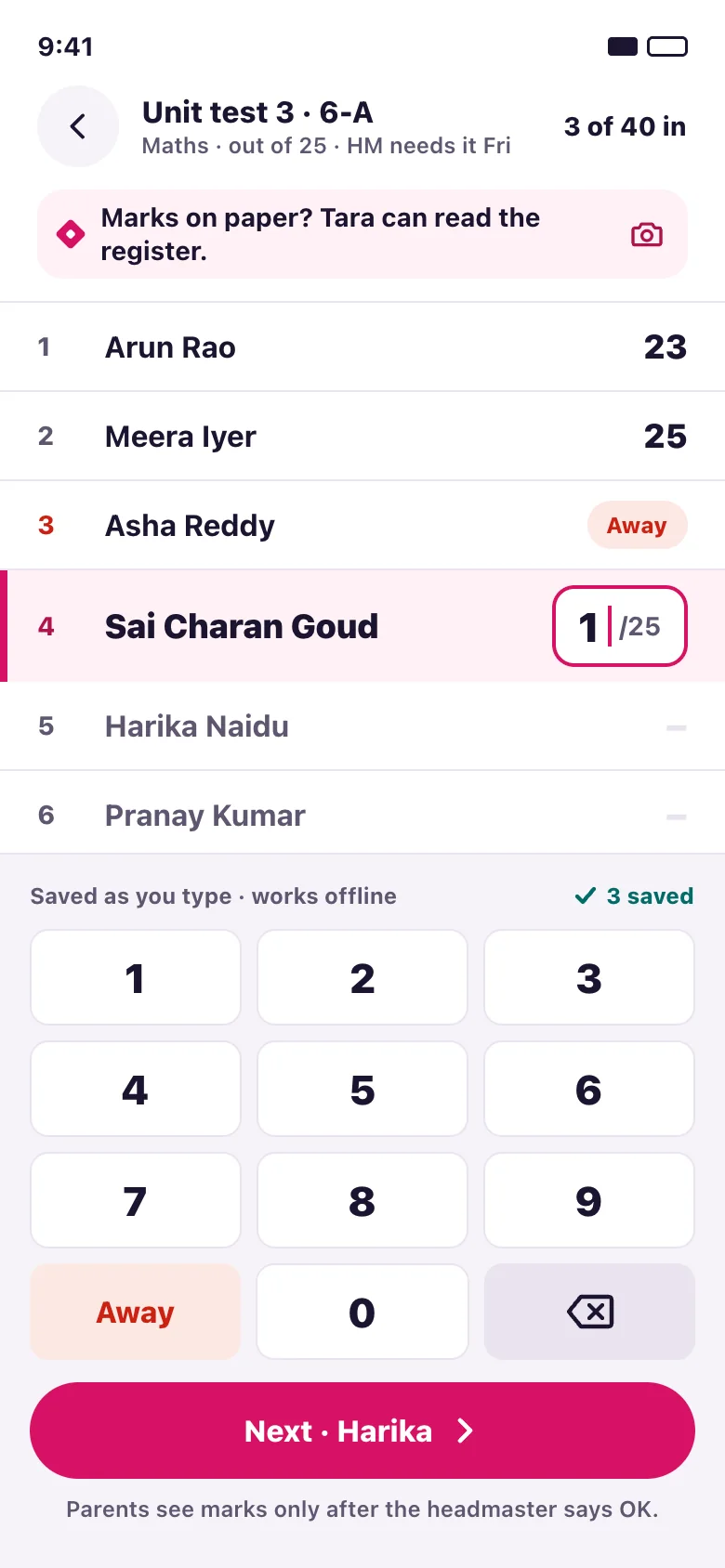
    Unit test 3 marks entry for 6-A with a number pad, Away button and a note that Tara can read a paper register
  6. 4:00 pm · At home

    Amma’s evening

    Arun’s day in Telugu: what he had, what’s due tomorrow, and what the school needs from home.

    Parent home screen in Telugu showing Arun is in school, the term fee due, Telugu homework due tomorrow and his timetable

Which Longbell is yours?

  • Schools

    One campus, a few hundred to a few thousand children

    For schools
  • School groups

    Many branches, each running its own day

    For groups
  • Coaching centres

    Batches, weekly tests, marks and ranks

    For coaching
  • Fully managed

    Our team sets it up and runs it with you

    How it works

Everything else, done properly

The whole school, not just the parts that fit in a demo.

Homework, fees, notices, results, certificates, permissions. Each one built for how an Indian school office really works, and each one with Tara inside.

Homework

Say it once. Tara writes the questions and marks the answers.

Speak the homework or snap the textbook page. You check every question and every mark before a child sees it.

Fees & receipts

A parent at the counter, a receipt in their hand.

Cash, UPI or cheque. A5 receipts with the amount in words, and every fee head keeps its own gap-free serial.

Notices & messages

Write it once. Every family reads it in their language.

To the whole school, a class, or twelve parents. Tara can draft it and schedule it for when they’re home.

Sports day · Friday

Sports day is this Friday from 8 am. Children come in their house T-shirt with a water bottle.

To all 438 families · in the app

Also on WhatsApp and SMS, for families who need it

For parents
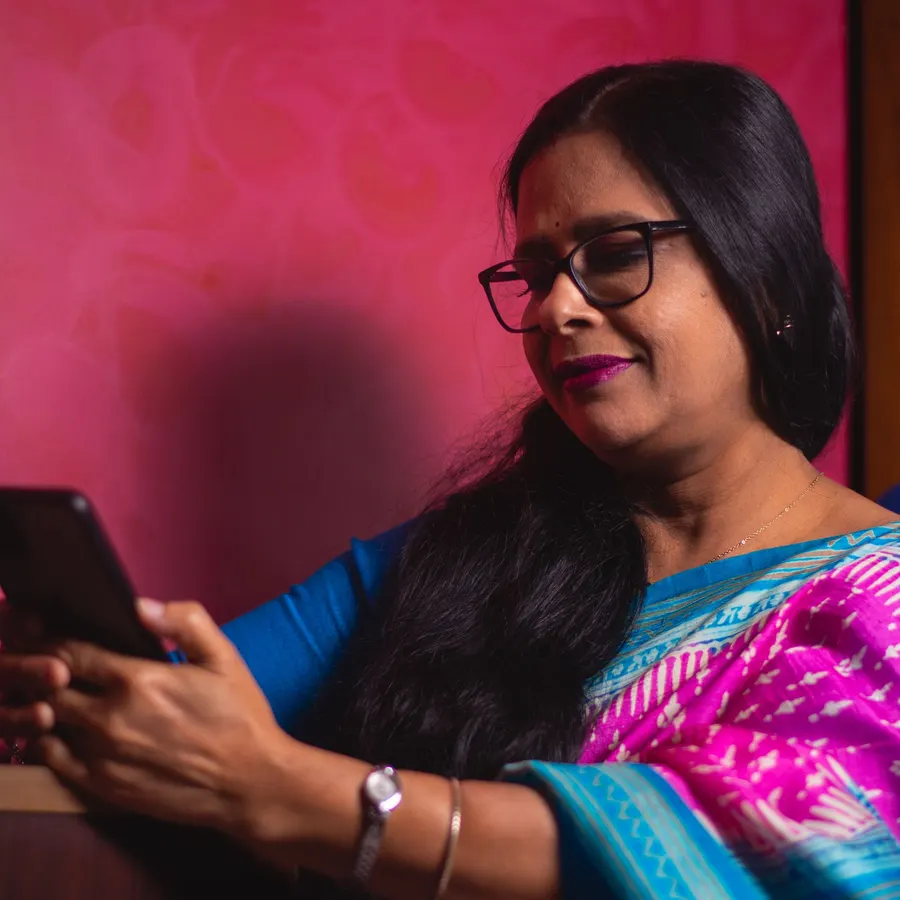
The school day, at home, in their own language.

A mother in a saree smiles as she reads her son's school day on her phone

Exams & report cards

Marks in, report cards out.

Grades, ranks that share ties, and a whole section’s cards printed on your letterhead.

For the head

Every register, at a glance.

Each kite is a class. The two still on the ground haven’t sent attendance yet.

38 of 40 registers in

Roles & permissions

Everyone sees their part.

29 permissions and 8 ready-made roles. The accountant gets fees, not marks.

Fees, not marks.

  • Collect fees(allowed)
  • Print receipts(allowed)
  • Take attendance(not allowed)
  • Enter marks(not allowed)
  • Publish results(not allowed)
  • Approve leave(not allowed)

Certificates & printing

Everything the office writes by hand, ready for the printer.

TC, bonafide and study certificates, admit cards, ID cards and fee statements, with your letterhead, signature and seal.

Getting started

Hand Tara your lists. She lays out the school.

Excel, CSV, PDF, Word, or a photo of the register. Nothing is saved until you have checked the preview.

See it all for schools

---

Everything you get

All of it. In every plan.

No add-ons, no locked modules, no “premium” tier. A school of 200 gets exactly what a group of ten branches gets.

Admissions and students

From the first phone call to the alumni list.

Enquiry and registration
Every enquiry from your website, phone or the front desk, followed up from one list.
Online admissions
Parents apply online, papers are checked in one queue, and the child joins a section with fees ready.
The whole school, imported by AI
Hand Tara your Excel sheets, old software exports, PDFs or photos of registers. She lays out every class and child for you to check.
Student records
Guardians, health, safety notes, papers and history for every child.
Alumni
Former students stay on record, searchable, with their certificates.
Data export
Any list to Excel (CSV), Word or PDF in one click.
How it works

Academics

Less writing for teachers, more teaching.

Timetable
Plan the week with clash warnings, set bell times, and find a cover teacher when someone is away.
Homework and assignments
Say it or snap the page; Tara writes the questions, children hand in, you mark.
Assignment discussions
Children ask questions on their homework and the teacher answers in the same thread.
Study materials
Notes, e-books, videos and links on shelves by class, section and subject.
Lesson plans and syllabus
Plan the week and share what each class is covering.
Exams and report cards
Marks once, grades and fair ranks, a whole section’s report cards on your letterhead.
Exam hall tickets
Admit cards for every child, printed two to a page.
Exam results
In the parent app, and by SMS and WhatsApp.
How it works

Attendance and leave

Who is in, who is away, and who said so.

Student attendance
A register in a minute that works on a weak signal. Parents of absent children are told.
Staff attendance
Who is in today, feeding straight into payroll.
Leave requests
Parents and staff ask in the app, the approver decides, and they hear back.
Leave balances
Every staff member’s leave left, by type.
Cover a class
The free teachers for that period, one tap away.
How it works

Fees and finance

Every rupee in and every rupee out.

Advanced fee plans
Fee heads, terms and due dates per class, applied in a tap, with per-child adjustments.
Fee counter
Cash, UPI or cheque. Any amount fills the oldest fees first.
Receipts sent to parents
Every receipt reaches the parent’s app, WhatsApp and SMS automatically.
Fee reminders
Reminders and pay links before and after the due date.
UPI pay links
Paid straight to your UPI ID with 0% cut; payment photos checked in one queue.
Concessions and scholarships
Merit, sibling and government schemes, tracked by scheme.
Expenses and finance
Bills with photos, approvals, and the month’s money in and out by category.
Payroll
Salaries from staff attendance, with optional PF, ESI, PT and TDS, and payslips on every phone.
How it works

Communication

Say it once. Every family hears it in their language.

Notices and circulars
To the whole school, a class or a few families, in each family’s language.
School news feed
Posts and photos from the school, reviewed before they go live.
School and events calendar
Holidays, exams, PTMs and events, on every phone.
Real-time notifications
Instant alerts to parents, students and staff on their phones.
Bulk SMS with your templates
Your own message templates, sent to any group, with SMS credits tracked.
WhatsApp bot and alerts
Parents ask for fees, receipts, results and certificates; alerts reach every linked number.
Complaints
Raised by parents, tracked by the office, closed with an answer.
Parent–teacher meetings
Ask the teacher, and book a meeting from the app.
How it works

Campus operations

The buses, the hostel, the store and the gate.

Transport
Bus routes with stops in order, driver and vehicle; parents see their child’s route.
Hostel
Blocks, rooms, wardens and who stays where.
Inventory
Stock, condition, location and value, with low-stock alerts.
Gate management
Authorised pickup people, gate passes and alerts, checked at the gate.
Safety and incidents
Safety notes for every child, and a calm record when something happens.
Digital library
Notes, e-books and videos from teachers, searchable by every child.
How it works

Certificates and printing

Everything the office used to write by hand.

Certificates
Bonafide, Study, Transfer (TC) and Achievement certificates, numbered in a register, revocable with a reason.
Certificate requests
Parents ask for a certificate in the app; the office prepares, signs and issues it.
ID card generator
The whole school’s ID cards, front and back, for A4 sheets or CR80 card printers.
Hall tickets and report cards
Admit cards and whole-section report cards in one print.
Receipts, statements and payslips
A5 receipts, fee statements and payslips with the amount in words.
Print anything
Any list or record, on your letterhead with signature, seal and registration numbers.
How it works

One app, everyone in control

Admins, office, teachers, students and parents, each seeing only their part.

One app for everyone
Administrators, office staff, teachers, students and parents sign in to the same app.
Roles and permissions
29 permissions and 8 ready-made roles. Give each staff member their own, limited to a class, a section or a campus.
Approvals in one inbox
Leave requests, payment photos, papers from parents, new parent links, teachers’ class access and expenses.
Multi-campus
Unlimited branches, each running its own day, seen together by the group.
History and safeguards
Who changed what, delete requests that need a yes, and a new school year you can undo.
How it works

Tara, your AI helper

Anything you do in Longbell. Just ask.

Answers with charts
Ask in Telugu or English; get the number, the chart and the records behind it.
Does the work, asks first
Record a fee, post a notice, chase what’s pending. Every change waits for your yes.
Reads your old lists
Excel, PDF, Word or a photo of the register, turned into your school.
Writes for you
Notices, parent messages and homework, drafted in the family’s language.
How it works

On every phone, tablet and office computer. Install it from the browser in one tap, get alerts on the phone, and keep working on a weak signal.

Read the guide

Longbell vs the usual school ERP

You’ve seen school software before. Not like this.

The usual school ERPLongbell
PriceHidden until a sales call, and priced by the moduleFrom ₹15,000 a year, on this page, for every feature
FeaturesPayroll, WhatsApp or the parent app sold as add-onsEverything in every plan, unlimited branches
Fees onlineA payment gateway that keeps 1.5 to 2% of every feeUPI straight to your account, 0% cut
AIA text box that writes paragraphsTara does the work, shows the change, and waits for your yes
ParentsEnglish menus and a login they forgetTheir language, their child’s day, and WhatsApp
Getting startedWeeks of data entry and trainingHand Tara your lists. Live in an afternoon, with free help

See every feature, each with its own page and how-to.

All features

Trust

Careful with a school’s records.

  • Aadhaar stays masked on every screen.

  • Download links stop working after 15 minutes.

  • Tara changes nothing until you say yes.

  • Who did what, and when, is written down.

  • A finished year can be rolled back.

    A paused account stays readable for 90 days.
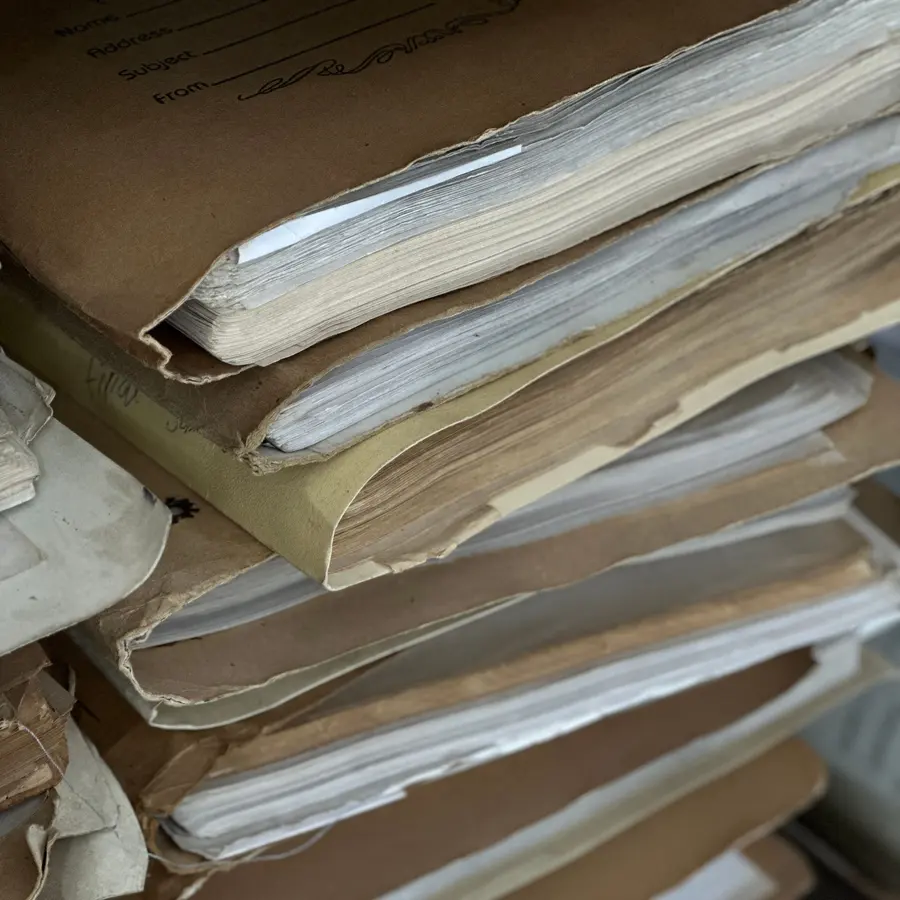
A stack of worn brown office files, the kind every school office keeps

Getting started

Up and running with your own lists.

The files, registers and Excel sheets you already keep are enough. Tara reads them, and you check before anything is saved.

  1. Tell us about your schoolA short call. We open your school’s own Longbell.
  2. Hand Tara your listsExcel, PDF, Word or a photo of the register. You check the preview before anything is saved.
  3. Invite your peopleStart from 8 ready-made roles, or build one from 29 permissions.

Pricing

One price for the whole school.

For a school of 500 children, a whole year is ₹15,000. That’s ₹41 a day, with every feature, every branch and every parent in it.

600

₹20,000 a year

₹1,667 a month · about ₹33 a child for the whole year

  1. Up to 500 children₹15,000 a year
  2. 500 to 1,000 children₹20,000 a year
  3. 1,000 to 1,500 children₹25,000 a year
  4. 1,500 to 2,500 children₹35,000 a year
  5. More than 2,500 childrenTalk to us

In every plan

  • Every feature on this page, for every person in your school
  • Unlimited branches, in every plan
  • Free help moving from the software you use today
  • Tara at cost: you pay what she uses, with 0% markup
Book a demo

On your own servers

100% private. It never leaves your building.

₹25,000 a year per branch

  • Unlimited children
  • Runs on your servers; you pay for the computers
  • Tara’s AI usage billed to you directly
Ask about on-premise
What does “children” mean for the price?

Children on your rolls this year, across all your branches. Staff, parents and logins are not counted.

How is Tara charged?

By what she actually uses, at the price the AI provider charges us. We add nothing on top, and you can set a monthly budget so there are no surprises.

We already use another school software. Can we move?

Yes, and we help for free. Send us your exports or even photos of the registers; Tara lays out your school and you check everything before it is saved.

Can it run on our own servers?

Yes. Longbell on your own servers keeps every record inside your walls. It is ₹25,000 a year per branch with unlimited children; you pay for your servers and for Tara’s AI usage directly.

Ring the first bell.

See Longbell with your own school’s lists and your own questions for Tara. We will show you around in Telugu or English.
  • A short call, at a time that suits your school
  • Bring a register or fee list, and watch Tara read it
  • We’ll tell you honestly what fits and what doesn’t

Book a demo

Your details go straight to our team, and we call or WhatsApp you to fix a time.